

Give Every Agent Least-Privilege API Access
Scoped organization API keys for pipelines and Terraform, plus personal access tokens that never exceed the linked user's live roles — so agents can triage, check on-call, and configure integrations under least privilege.
Published: Tuesday, 25 August 2026
We overhauled public API authentication. You no longer need a single, all-powerful organization key. Scoped organization API keys and personal access tokens (PATs) let pipelines, Terraform, and your own agents operate All Quiet under least privilege. This is available on Pro and Enterprise plans with an active subscription.
Least-Privilege Organization Keys and PATs
You can now create organization API keys scoped to specific resources, teams, and IP ranges. These keys act as the organization and serve pipelines and Terraform. Rate limits apply per API key.
Pro and Enterprise users can also create personal access tokens. A PAT acts as the linked user. Effective access equals the intersection of the token scopes and the user's live roles. If you lack permission to perform an action in the UI, your PAT cannot perform it via the API. Out-of-scope calls return a 403 error.
| Organization API key | Personal access token | |
|---|---|---|
| Acts as | The organization (no human) | The linked user |
| Access model | Key scopes + org/team allowlists | Intersection of token scopes and the user's live roles |
| Typical use | Terraform, CI/CD, org-wide automation | An engineer's agent or personal scripts |
| SCIM / lock as provisioned | Allowed if scoped | Not allowed |
See authentication for display names, scopes, expiry, and IP filters.
Breaking Changes
API resource locking. Previously, the API treated any created or updated resource as provisioned. Provisioned resources become read-only in the web UI.
The public API no longer locks resources by default. If you create or update resources like teams, integrations, or status pages using a PAT or organization key, they remain editable in the product.
- To lock a resource with an organization key, you must pass
provision=true. - PATs cannot lock resources and cannot modify already provisioned resources.
- The All Quiet Terraform provider still marks resources as provisioned automatically. See the Terraform documentation.
DELETE status codes. Successful DELETE requests now return 204 No Content instead of 200. Update clients that treated only 200 as success.
Public API rate limits. Limits apply per API key. Both organization keys and personal access tokens count independently. All windows apply at once; exceeding any of them returns HTTP 429 Too Many Requests.
| Time window | Maximum requests per API key |
|---|---|
| 20 seconds | 300 |
| 300 seconds (5 minutes) | 900 |
| 3,600 seconds (1 hour) | 5,400 |
The 5-minute window is tighter than the previous cap. The hourly window is new. Retry after a short backoff when you receive 429.
Organization Controls and Auditing
Organization owners control PAT usage so security and compliance do not rely on users to self-govern.
- Disable PATs: Owners can stop new PAT creation. Enabling this setting also cuts off existing PATs from accessing the organization.
- Enforce IPs: Owners can set a mandatory IP filter for all API requests targeting the organization.
- Revoke Tokens: Owners can view and revoke PATs for users provisioned into the organization.
- Audit Views: The audit log now records when someone views an API key or PAT secret. You can also export audit events via the Public API.
Learn more in the auditing documentation.
Agent-Ready Incident Management
These changes let you build custom agents against All Quiet safely. Give agents specific scopes to triage incidents, check on-call schedules, or configure integrations under least privilege. Review the authentication documentation to configure display names, scopes, and IP filters correctly, and never paste real keys in your repositories.
For the agent-operable model — bring your own LLM, scoped credentials, no inference on our servers — see AI Incident Management.
More updates
-
Override Incident Dates and Times
Set custom start and end times for incidents on status pages so stakeholders see the real customer-impact window. All Quiet keeps your internal audit timestamps unchanged.
-
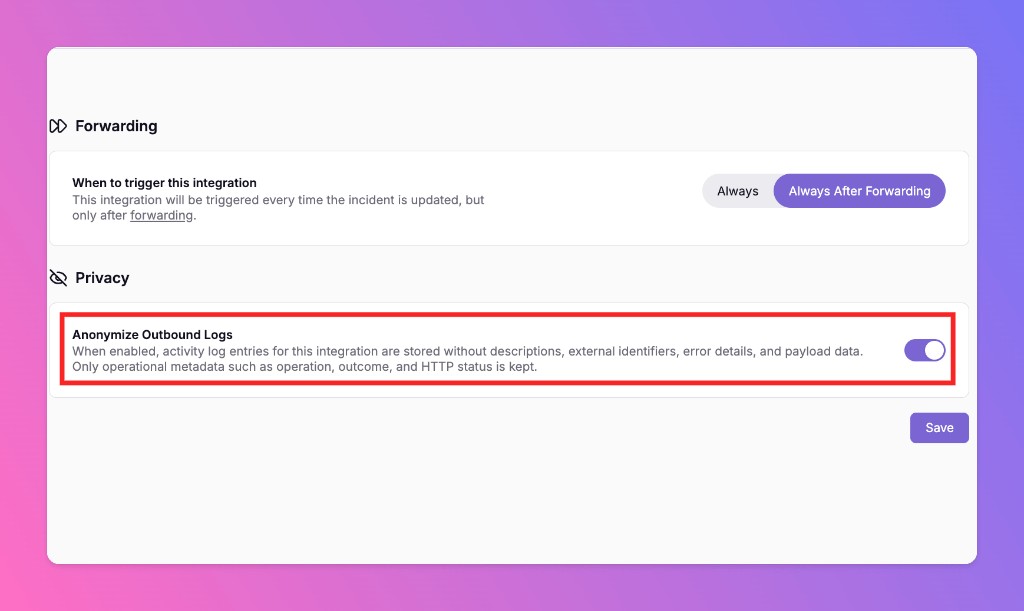
Anonymize Outbound Logs
All Quiet offers a new privacy setting for outbound integrations. Anonymize Outbound Logs strips sensitive payload data from activity logs and retains only the metadata needed to verify delivery.
Published