

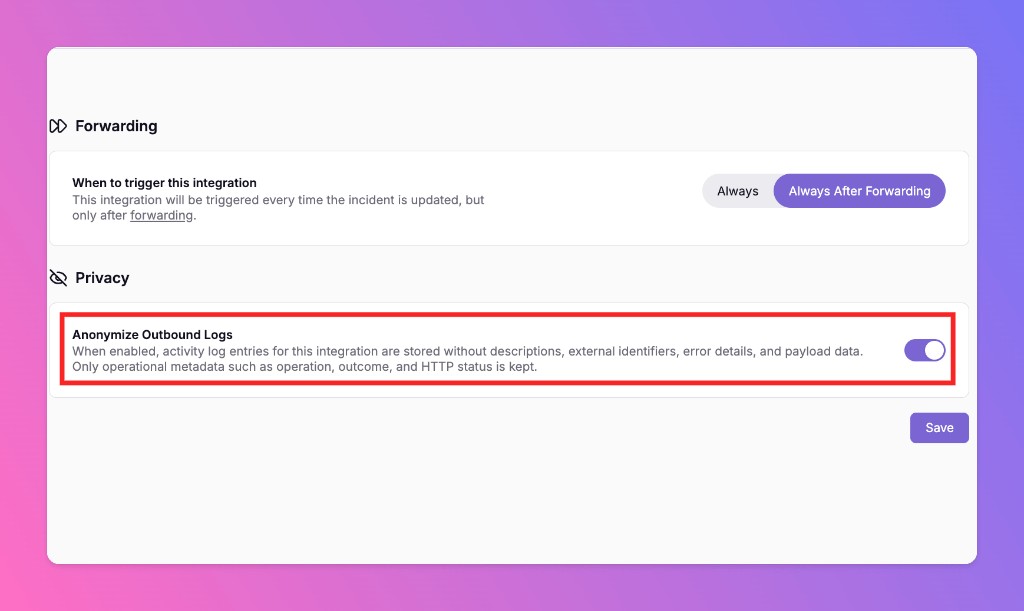
Anonymize Outbound Logs
All Quiet offers a new privacy setting for outbound integrations. Anonymize Outbound Logs strips sensitive payload data from activity logs and retains only the metadata needed to verify delivery.
Published: Friday, 14 August 2026
Anonymize Outbound Logs is a new privacy setting for outbound integrations. When you enable it, All Quiet strips sensitive payload data from activity logs and keeps only the operational metadata needed to verify delivery.
The toggle lives on the edit page of any outbound integration that supports history. It is disabled by default.
Key Benefits and Details
| Feature | Description |
|---|---|
| Primary Goal | Improve data privacy without losing the ability to confirm that outbound deliveries succeeded. |
| Availability | Outbound integrations that support history. Off by default. |
| Location | Integrations → Edit an outbound integration → Anonymize Outbound Logs. |
How It Works
- Open the integrations menu in your All Quiet workspace.
- Click Edit on a specific outbound integration.
- Toggle Anonymize Outbound Logs on.
- Save the configuration.
When the setting is enabled, All Quiet anonymizes data in two places:
- The main outbound history logs
- The Outbound Integration Activity section on incident details
Data Retention
Anonymization follows strict rules so you can still audit deliveries:
| Data | Handling |
|---|---|
| Removed | Descriptions, external identifiers, error details, and payload data |
| Retained | Operation, outcome, and HTTP status |
More updates
-
Give Every Agent Least-Privilege API Access
Scoped organization API keys for pipelines and Terraform, plus personal access tokens that never exceed the linked user's live roles — so agents can triage, check on-call, and configure integrations under least privilege.
-
Salesforce Two-Way Integration
We launched a new Salesforce integration for the All Quiet platform. You can now synchronize All Quiet incidents and Salesforce cases. The configuration supports two-way, inbound-only, and outbound-only modes.
Published