

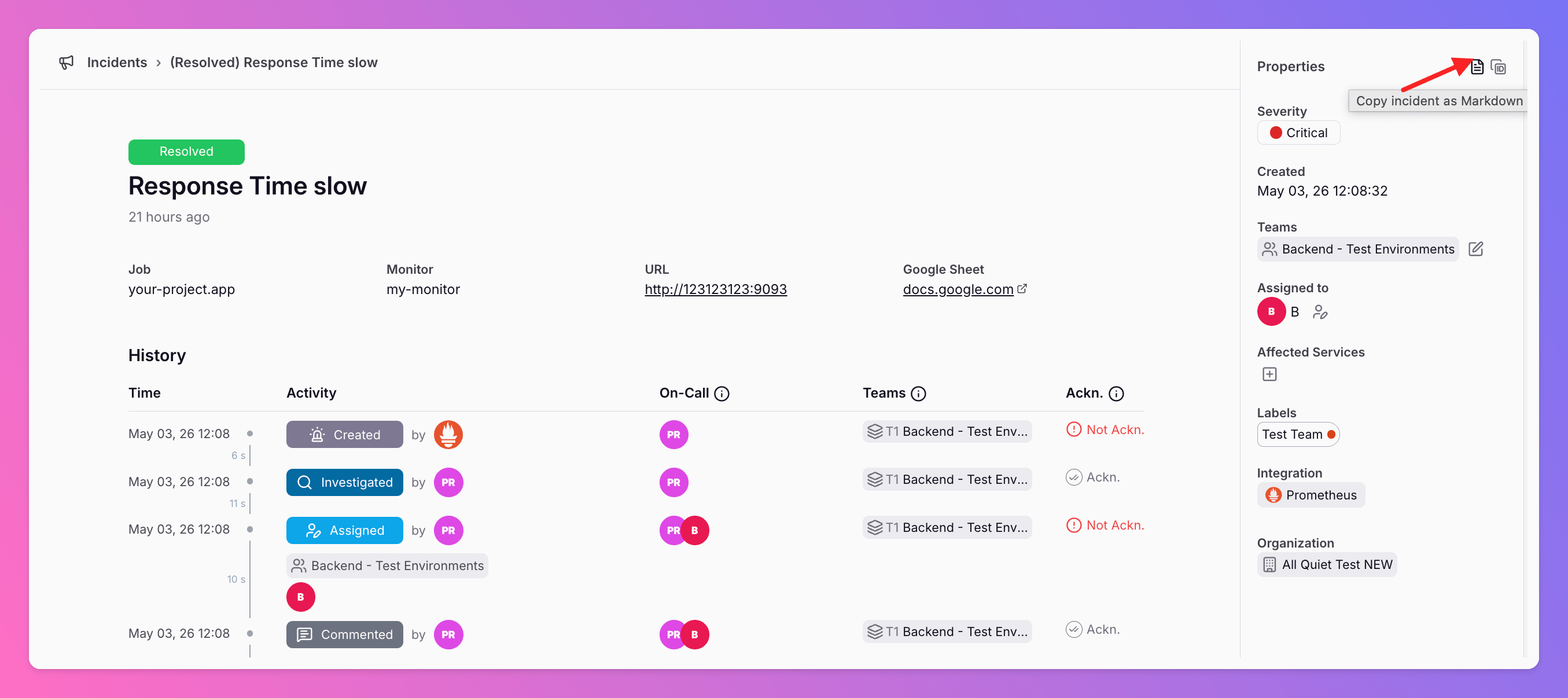
Export All Quiet Incidents as Markdown
Copy full incident data and event timelines as Markdown from the All Quiet web app or Public API. This feature provides structured data for postmortems, internal tickets, and AI analysis.
Published: Monday, 04 May 2026
Copy full incident data and event timelines as Markdown from the All Quiet web app or Public API. This feature provides structured data for postmortems, internal tickets, and AI analysis.
Feature Overview
| Function | Application |
|---|---|
| Markdown Export | Copies the full incident history and event logs to the clipboard. |
| Public API | Fetches incident data programmatically for automated pipelines. |
| Data Fidelity | Exports chronological logs that match your internal audit logs. |
Practical Applications
- Incident Retrospectives: Generate factual timelines for postmortem reports instantly.
- Ticketing: Paste incident context into internal support tickets or runbooks for better visibility.
- LLM Context: Provide structured data to internal AI models for summaries and root cause analysis.
How to Access
- Web App: Navigate to incident details and select the Markdown export option.
- API: Use the Public API to retrieve incident data for specific teams or organizations.
Use these exports to improve communication and response speed across your entire engineering organization.
More updates
-
New Outbound Integrations: Google Docs and Google Sheets
Forward All Quiet incidents directly to Google Workspace. This integration automates documentation for postmortems and historical records within your existing team workflow.
-
New Integration: GitHub Two-Way Sync for Incident Management
We created a GitHub integration to support flexible workflows between your code and your on-call alerts. You can now sync GitHub issues and All Quiet incidents in three ways.
Published