

Filter On-Call Report by Team
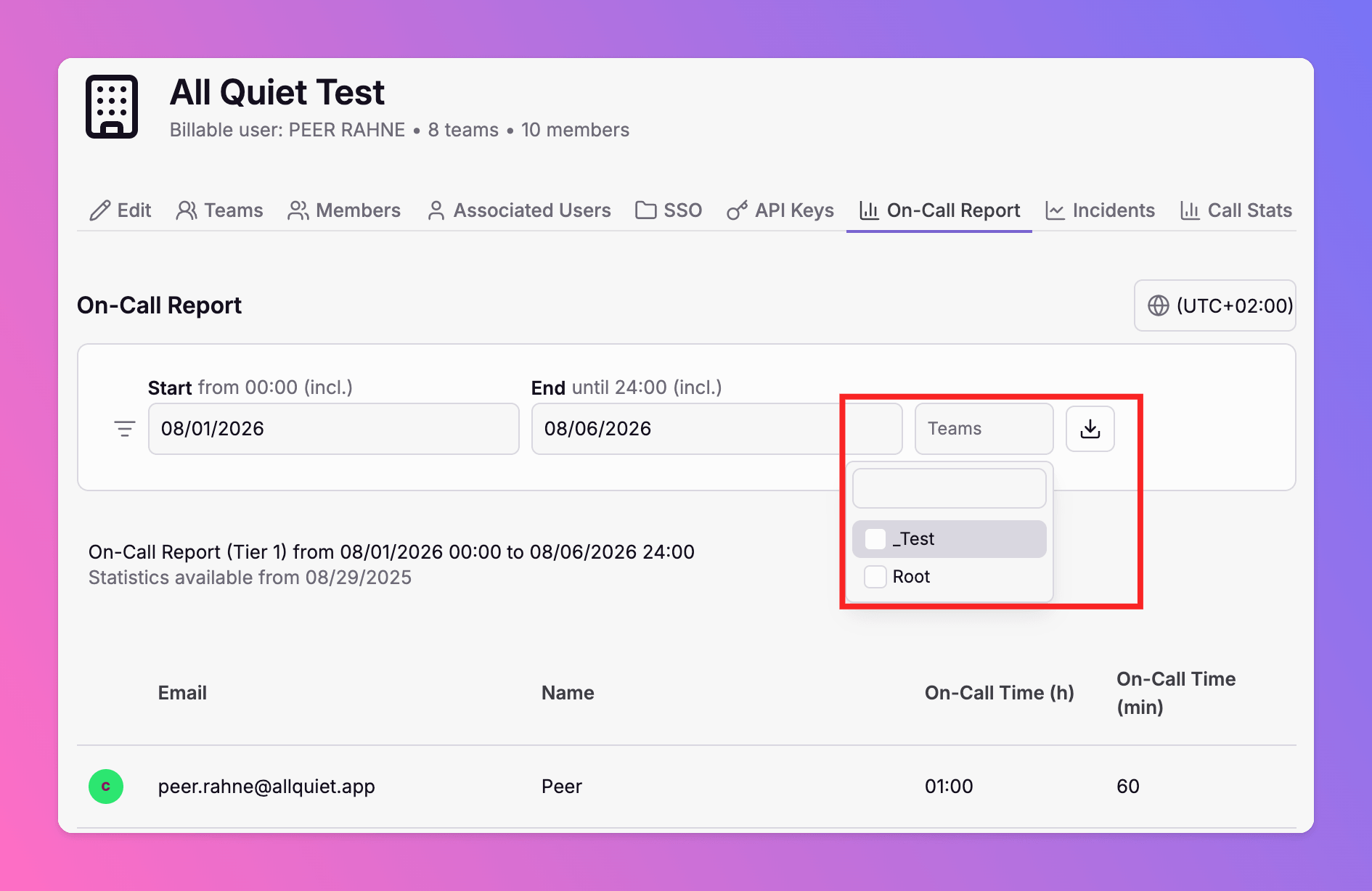
The on-call report now supports team-level filtering. Select one or more teams to calculate on-call hours for those teams only — in the web app and via the Public API.
Published: Thursday, 06 August 2026
We've added an option to filter the on-call report to team level. Only on-call hours within the selected team(s) are calculated — useful when you need per-team on-call totals for payroll, capacity planning, or compliance.
Available for Organizations on Pro and Enterprise plans.
Web App
Open Organizations → On-Call Report and use the new Teams filter. Leave it empty to include all teams (existing behavior), or select one or more teams to scope the report. The report header and CSV export reflect your team selection.
Public API
Team filtering is also available on the Public API endpoints:
| Endpoint | Team filter parameter |
|---|---|
GET /api/public/v1/on-call-report |
TeamIds — pass one or more team GUIDs |
GET /api/public/v1/on-call-report/sum |
TeamId — pass a single team GUID |
Examples:
GET /api/public/v1/on-call-report?Start=2026-08-01&End=2026-08-31&TeamIds=<team-id-1>&TeamIds=<team-id-2>
GET /api/public/v1/on-call-report/sum?Start=2026-08-01&End=2026-08-31&TeamId=<team-id>
Learn more in the Reports documentation.
More updates
-
Public API Rate Limits
All Quiet now enforces rate limits on the Public API. Each API key is limited to 300 requests per 20 seconds and 2,700 requests per 5 minutes.
-
Linear Integration: Custom Priority and Severity Mapping
All Quiet now lets you map incident severities to Linear issue priorities. Configure inbound and outbound mappings to fit your team's workflow and improve incident response accuracy.
Published