

Improved Slack, Teams and Mattermost Message Formats
We updated how All Quiet formats incident messages in Slack. Additionally, we also improved display of group incidents in Microsoft Teams and Mattermost, as well as in email notifications
Published: Monday, 27 July 2026
Changelog: Improved Slack Message Formats
Summary: We updated how All Quiet formats incident messages in Slack. Additionally, we also improved display of group incidents in Microsoft Teams and Mattermost, as well as in email notifications
Slack Integration Updates
We redesigned Slack incident messages to save screen space and speed up your response times.
- Direct Links: We linked the incident title directly to the All Quiet platform. We removed the separate "Show on All Quiet" button.
- Improvements for Mobile: We moved secondary actions into a clean overflow menu, instead of listing all actions below the message.
- Modal Comments: You now add comments through a popup modal instead of an inline text field.
- Compact Attributes: We format attributes using simple
Name: valuetext. Pretty-printed JSON is compacted to one line. Long values now use full-width blocks to save vertical space. - Privacy Controls: We added a
HideActivityHistorysetting. You can enable this via the web UI (Settings > Outbound Integrations > Slack) or the public outbound-integrations API. This setting hides the event history block in Slack to keep your incident channels secure and focused. - Image Fallbacks: Broken image URLs now display a simple "View image" text link. This prevents message delivery failures.
Cross-Platform Updates (Teams, Mattermost, Slack)
We improved how integrations display grouped incidents across Slack, Microsoft Teams, and Mattermost.
- Attribute Merging: When a grouped incident contains exactly one sub-incident, we merge the parent grouping keys (like
GroupId) and sub-incident attributes (likeDesc). This matches our standard web preview behavior.
Email Notification Updates
We simplified our email layout to help you reach your incident details faster.
- Direct Links: We made the email incident title a direct link to the incident. We removed the separate "View" button.
Quick Reference
| Platform | Update Type | Key Change |
|---|---|---|
| Slack | Layout | Incident titles act as direct links. Message sizes use less vertical space. |
| Slack | Interactivity | Primary workflows get dedicated buttons. Comments open in a modal. |
| Slack | Security & Privacy | Users can hide activity history via API or UI settings. |
| Slack, Teams & Mattermost | Data Display | Single sub-incidents merge with parent grouping keys. |
| Notifications | Incident titles link directly to the incident. |
More updates
-
Content Testing and Response Logging for HTTP Monitors
We added two new features to the Website and HTTP Monitor. You can now test HTTP responses for specific content and log the response body during an incident.
-
Inbound webhooks: IP filter and bearer authentication
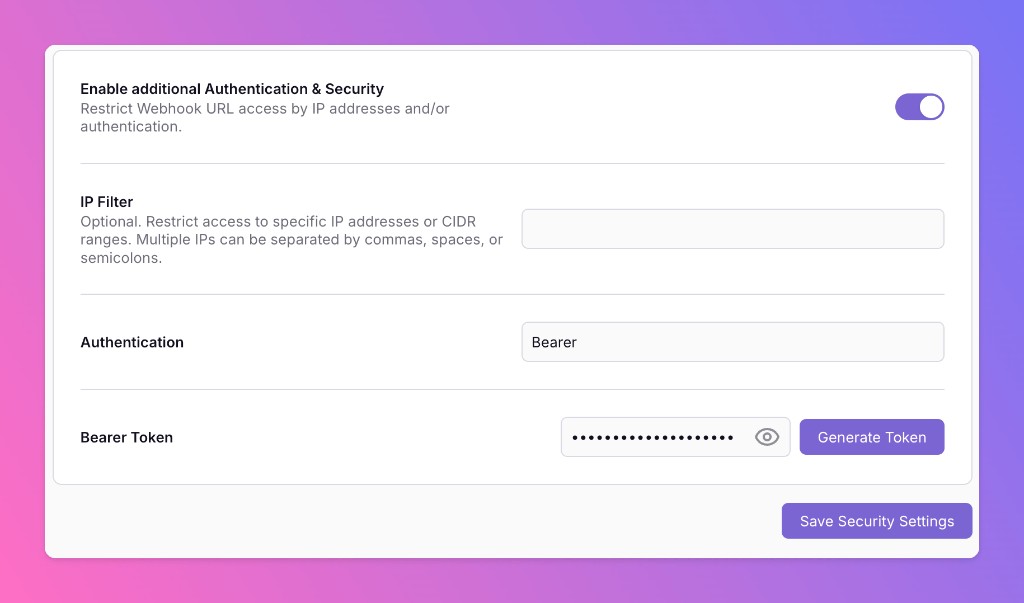
Webhook-based inbound integrations can now restrict who can POST to your URL. Optionally enable IP filtering, bearer token authentication, or both — so only your monitoring tools can open incidents.
Published